
What to Look At During a Mining Farm Walkthrough
A hosted mining contract is usually sold with photographs, and photographs are chosen. The useful information comes from a walkthrough you do yourself, ideally on a normal working day rather than a scheduled tour. Thirty-six hours of running a petahash is worth 0.00067291 BTC, or $56.99 at $84,692 per BTC, and that figure is your reference point: whatever the site does to uptime shows up directly against it.

Key takeaways
- One and a half days at 1 PH/s credits 0.00067291 BTC, so an outage measured in hours has a visible price.
- Judgement comes from the aisles, not the sales deck: dust, cable routing, spare parts and the state of the repair bench.
- Ask to see a machine that failed last week and how long it took to return to service.
- Compare the site's reported hashrate with the pool account for the same machines before signing anything.
Start with the floor, not the brochure
Walk in without a presentation. The first minute tells you more than an hour of slides: how the door is sealed, whether the air is moving, whether the floor is clean enough that a dropped screw would be found, and whether anyone in the room looks busy. A facility that is quiet in the middle of a working day is either very well automated or under-staffed, and the difference matters when a board fails at 2 a.m.
Look at the machines rather than the room. Uniform LED patterns across a rack mean the fleet is configured consistently; a rack with three machines dark and no maintenance tag means nobody has walked that aisle recently. Ask what the tag system is. A host that can tell you when a unit was pulled, by whom and what was replaced is a host that will be able to answer the same question when the unit is yours.
Airflow and heat are the parts a camera misses
Ask to see the intake side of a rack. Cold aisles should be cold, and hot aisles should be hot, with a clear boundary between them. If the temperature feels similar on both sides, containment is poor and the machines are running hotter than they need to. That does not necessarily mean failure, but it means fans spin faster, power per terahash rises, and the useful life of the hardware shortens.
Then ask about the cooling plant. What happens when the outside temperature hits its annual maximum? Is there redundancy on the pumps, the condensers or the chillers? A single cooling loop with no standby is a single point of failure for the entire site, and a farm that cannot describe its failure mode in plain words has probably not tested it. You are not buying an engineering audit; you are checking whether the operator thinks in terms of what happens when something breaks.
Look at the repair bench and the spare shelf
The bench is where uptime is actually made. Look for organised tools, an anti-static mat, labelled trays and a queue of machines with notes attached. Look at the shelf of spare parts: hash boards, fans, power supplies and control boards. A facility with no spares is dependent on shipping times, and shipping times are measured in weeks when a container of failed units is waiting behind customs.
Ask two specific questions. How many units failed in the last month, and what was the median time from failure to hashrate restored? Then ask to see the log that produced the answer. A vague number is a sign that nobody is tracking it; a number with a source is a sign that uptime is a managed metric rather than a marketing word.
Thirty-six hours, in the account and on the floor
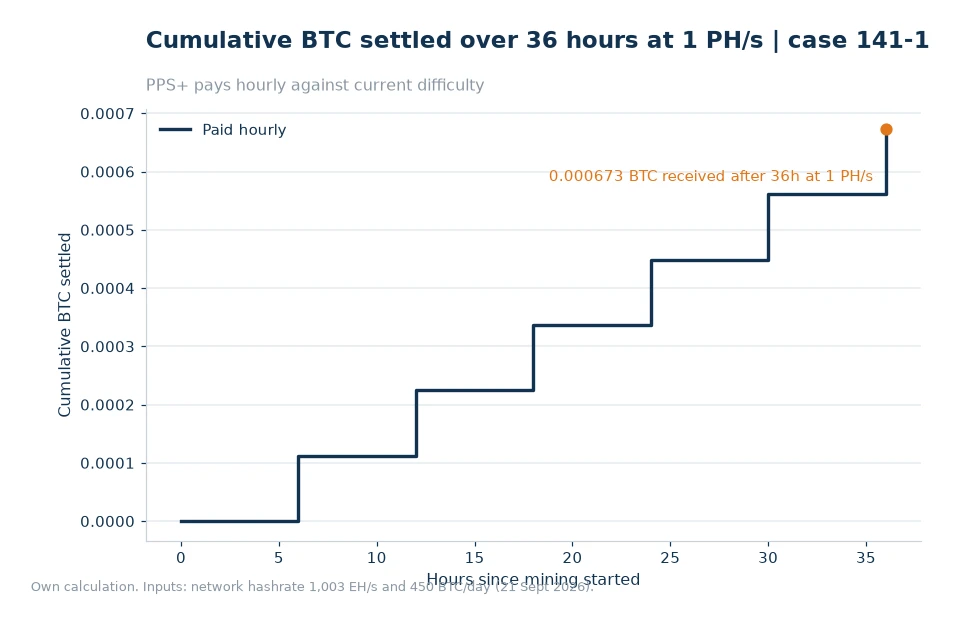
The chart for this piece is a day and a half at 1 PH/s, which is a convenient length for a site visit because it spans a full working day plus a night. Each step is an hourly PPS+ credit against current difficulty. Nothing about the site changes the shape of the staircase; what the site changes is whether the steps keep appearing at three in the morning. Sites that list their facilities under ViaBTC Mining Farms are the natural shortlist, because the same four checks can be applied to each of them in turn.
Ask the host to show you a 36-hour hashrate trace for a rack that resembles yours. Then compare it with the pool hashrate history for the same period. If the host claims continuous operation and the account shows a two-hour gap, the gap is the finding: either a power event, a network event or a reporting gap, and each has a different fix. Doing this comparison before signing is much easier than doing it in the first month of a contract.
| Check | Good signal | What a bad result costs |
|---|---|---|
| Aisle temperature | Clear cold and hot sides | Higher power draw per terahash, shorter hardware life |
| Spare parts shelf | Boards, fans and PSUs on hand | Weeks offline waiting on shipping |
| Repair bench | Labelled queue, anti-static setup | Slow turnaround, unexplained failures |
| 36-hour trace | Unbroken hashrate line | Each missing hour costs 0.00001869 BTC at 1 PH/s |
Worked example
Convert the visit window into money so the questions have a price attached.
- Network output per TH/s per day: 450 ÷ 1,003,000,000 = 0.00000044865 BTC.
- At 1,000 TH/s: 0.00044861 BTC a day.
- Per hour: 0.00044861 ÷ 24 = 0.000018692 BTC.
- Thirty-six hours: 36 × 0.000018692 = 0.00067291 BTC, the top of the chart.
- In dollars: 0.00067291 × 84,692 = $56.99.
- Two hours of unplanned downtime inside the window: 2 × 0.000018692 = 0.00003738 BTC, or $3.17.
- Repeat that twice a month and the annual figure is about 24 × $3.17 = $76.08 per petahash, before counting the labour of chasing it.
Those numbers look small because a petahash is small relative to a facility. Multiply by the hashrate you intend to place and the same arithmetic becomes the reason to spend an afternoon on site rather than an hour on a video call.
Frequently asked questions
How long should a farm inspection take?
Half a day is enough to walk the aisles, see the bench and review a 36-hour trace; anything shorter turns into a tour of the reception area.
What is the single most telling thing to look for?
The spare parts shelf. A facility holding boards, fans and power supplies is prepared for the failures that decide 0.00067291 BTC per 36 hours at 1 PH/s.
Can I verify a host's uptime claim myself?
Yes, for machines you own or will own. Compare the host's hashrate trace with the credit history in your own pool account over the same window; the two series should agree.
Book the visit before the contract, not after
A walkthrough is cheap and the information is asymmetric: the host knows what a bad week looks like and you do not. Arrive with four things to see, the aisle temperatures, the bench, the spares and a 36-hour trace, and leave with photographs and names. Then read the contract against what you saw, because the clause about repairs only means something if you know whether the bench can actually perform them.
The Mining Companies directory is a reasonable starting list of operators that take third-party machines. It does not substitute for standing in the aisle. Use it to build a shortlist, then spend the time on the two or three sites that survive the first call, and bring the arithmetic with you so a claim about uptime can be turned into a number on the spot.
Sources: ViaBTC farms and companies pages for hosting categories, and the fee page for the listed 4% on the PPS-settled block reward[1]. The 21 Sept 2026 chain reading was 132.76 T difficulty, about one zettahash of network power, a 3.125 BTC subsidy, 144 blocks a day and a BTC price of $84,692. Figures for this piece were read 21 Sept 2026, and it was published 24 Oct 2026.